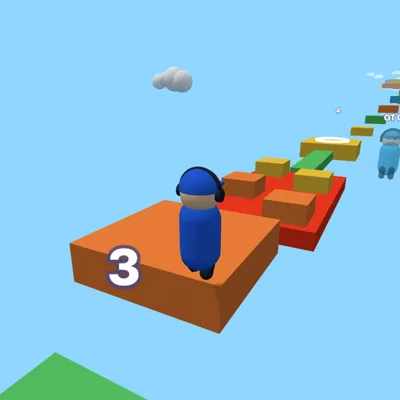
How to play
- Start at the checkpoint and move along the course.
- Jump between platforms; don't touch lava or the spinning red bars.
- Reach the next checkpoint with the spinning ring.
- Yellow pads launch you high, white tiles vanish shortly after you step on them.
- Reach the flag on stage 40 to win.
Controls
Keyboard: run with WASD or arrow keys, jump with Space, turn the camera with Q/E or by dragging the mouse, P to pause. Touch: left side joystick, right side camera, JUMP button at bottom right.
About the game
Sky Obby is a 40-stage 3D obstacle course built above the clouds. Across four worlds — Meadow, Candy Land, Neon Night and Cloud Peak — you jump from platform to platform, time your moves on sliding floors, hop across stepping stones over lava and leap over spinning bars. Every stage starts with a checkpoint, so when you fall you restart from the last one you reached, and your progress is saved on your device. Jump pads launch you high into the air, ice makes you slide, conveyor belts push you sideways and vanishing tiles disappear under your feet. A new outfit color unlocks every five stages. The leaderboard in the top right lets you race against BOT rivals; the goal is to reach the summit before them. If you get stuck on a stage, you can watch a short optional ad to skip it. On a keyboard, run with WASD or the arrow keys and jump with Space; drag with the mouse to turn the camera. On phones, the left side of the screen is a joystick and the button at the bottom right jumps. Free to play with no download or sign-up.
🧗 Obby & Parkour Games🎯 Skill Games🏃 Running Games
FAQ
Is my progress saved in Sky Obby?
Yes, the last checkpoint you reached is saved on your device and you continue from there when you return.
Are the rivals real players?
No, the rivals on the leaderboard are computer characters marked as BOT. There is no chat or contact with other players.
Can I play on my phone?
Yes. There is a joystick on the left and a jump button at the bottom right; drag the right side to turn the camera.