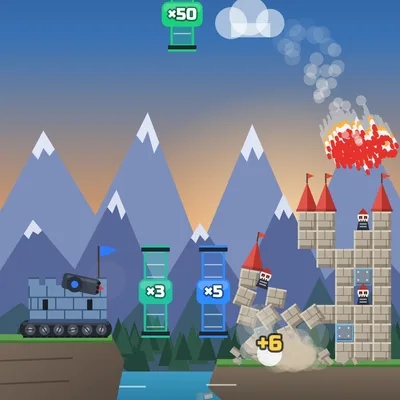
Send your missiles through ×10 and ×50 gates to multiply them and bring the stone castle down block by block! 25 levels.
About the game
Rocket Siege: Castle Crash is a missile siege game set between two islands in the middle of the sea. The tracked fortress on the left cliff is your base; drag on the screen to bring up a dotted aiming arc, and the moment you let go a missile takes off with a smoke trail. The real fun starts in the air: every gate a missile flies through changes your swarm. Purple ×10, blue ×5 and green ×50 gates turn a single missile into a huge swarm, +5 and +10 gates add extra missiles, while red −5 and ÷2 gates shrink it. The castle on the far island is not one solid piece: stone blocks, shielded steel blocks, wooden scaffolds and red-roofed towers break one by one, and blocks that lose their support fall and crush the ones below. Skull-masked guard robots posted in windows and on battlements topple over and burst into gears and smoke. Once most of the castle is gone the rest collapses, and the game rolls straight into the next level. Later levels bring gates that slide up and down, spinning gates that flip from ×10 to ÷2, and wind that pushes your missiles. Spend gold on missile power, starting missiles and extra shots, and grab gold chests to add missiles to your volley for the whole run. After 25 handmade levels, an endless MASTER mode begins. It is free and needs no download.
How to play
- Drag on the screen to aim; the dotted arc shows where your missile will fly.
- Lift your finger to launch a volley; keep an eye on your shots in the counter at the bottom.
- Fly your missiles through ×2, ×5, ×10, ×50 and +5 gates and avoid red −5 and ÷2 gates.
- Hit the lower blocks to make the castle cave in; when the CASTLE bar runs out the whole castle collapses and the next level starts.
- Use the UPGRADE button to spend gold on missile power, starting missiles and extra shots.
Controls
Touch and mouse: drag on the screen to aim and release to fire (a tap without dragging fires at the current angle); tap the UPGRADE button in the bottom-left corner to open the upgrade panel. Keyboard: up/down arrow keys or W/S to raise or lower your aim, Space or Enter to fire, U to open the UPGRADE panel and 1-3 to buy in the panel. P: pause.
🛡️ Defense & Army Games⚡ Action Games🎯 Skill Games
FAQ
How do the gates change my missiles?
Each missile that flies through a gate gets the gate's operation: ×2, ×5, ×10 and ×50 multiply every missile by that amount, +5 and +10 add extra missiles to the volley, −5 removes five and ÷2 halves the swarm. Missiles spread out a little as a swarm, so a few may miss the gate.
When does the castle count as destroyed?
The CASTLE bar at the top counts the broken and fallen blocks and the toppled guards. When the bar runs out, at roughly seventy percent destroyed, the rest of the castle collapses by itself and the game moves on to the next level. The more shots you have left, the more stars and gold you earn.
What happens if I lose, and is my progress saved?
Your level and the missiles from chests are saved on your device, so you continue from the same level even after a refresh. If you run out of shots while the castle still stands, you can watch an optional ad to continue right where you were with three more shots, or start over. Gold, upgrades and unlocked fort styles always stay.