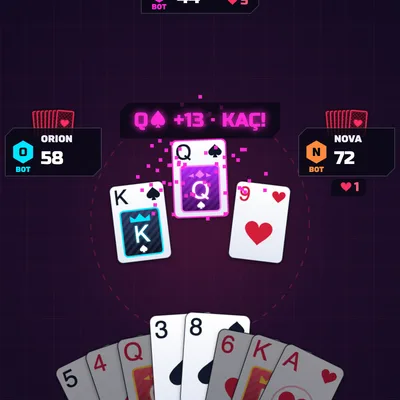
Play Hearts free online: dodge every heart and the Queen of Spades, shoot the moon and beat 3 smart bots. No download.
About the game
Hearts is the classic four-player trick-taking card game where the goal is to take as few points as possible, and here you can play Hearts online for free, right in your browser, on a phone in portrait or landscape and on a desktop. You sit at a dark neon table against three computer opponents, each clearly labelled BOT. Every heart you win in a trick is worth 1 point and the Queen of Spades is worth 13, so each hand hides 26 points that nobody wants. Before each hand you pass three cards: to the left, then to the right, then across, and every fourth hand there is no pass at all. The player holding the 2 of clubs leads the first trick, everyone must follow suit if they can, and hearts cannot be led until they have been broken by someone throwing one on a trick. By default no points may be thrown on the first trick, and you can switch that rule off in the menu. When any player reaches 100 points the game ends and the lowest score wins. The big gamble is Shooting the Moon: take all thirteen hearts and the Queen of Spades in one hand and, instead of 26 points, every opponent gets 26, or you can pick the variant where your own score drops by 26, or choose each time. The bots are built to be tough opponents. They pass dangerous cards such as the Queen, Ace and King of spades and high hearts, empty short suits to create voids, count the cards that have been played, remember who is out of which suit, duck under winning cards, flush the Queen out with low spades and notice when someone is trying to shoot the moon so they can block it. In the career mode every match you win takes you up a level and the bots play sharper; after level 10 you reach the master table. Illegal cards are dimmed on your turn and the game tells you why a card cannot be played, the cards passed to you glow green, and a scoreboard keeps every hand. Your match is saved, so you can close the page and continue later. Play free Hearts with no sign-up and no download.
How to play
- Before each hand pick 3 cards to pass and press PASS; the arrow shows where they go (left, right, across or no pass).
- The 2♣ leads the first trick. On your turn tap a card: you must follow suit, and cards you cannot play are dimmed.
- Avoid taking hearts and the Queen of Spades: each heart is 1 point, the Q♠ is 13. Hearts cannot be led until broken.
- Feeling brave? Shoot the moon: take every heart and the Q♠ and your opponents get +26 (or you get −26).
- When someone reaches 100 the lowest score wins; win the match to level up and the next match starts on its own.
Controls
Touch/mouse: tap 3 cards to pick your pass and press PASS; tap a card to play it. The SCORES button opens the scoreboard and tapping the end-of-hand panel starts the next hand. Keyboard: ← → move between cards, ↑ ↓ switch rows in the phone layout, Space selects/plays a card, Enter passes or plays, T scoreboard, P pause. In the menu use ↑ ↓ and Enter.
🎲 Board & Card Games👫 2 Player & Multiplayer🕹️ Classic Games
FAQ
How do you play Hearts?
Each of the four players gets 13 cards and passes three before every hand. The 2 of clubs leads the first trick and everyone must follow suit; a player with no card of that suit may throw anything. The highest card of the led suit takes the trick. Each heart is 1 point and the Queen of Spades is 13. When someone reaches 100 points the game ends and the lowest score wins.
What is shooting the moon in Hearts?
If you take all 13 hearts and the Queen of Spades in one hand, instead of scoring 26 yourself each of the other three players gets 26 points. In the menu you can switch to the variant where 26 is subtracted from your score, or choose each time.
When are hearts broken, and can points be played on the first trick?
Hearts are broken the first time a player who cannot follow suit throws a heart; until then you cannot lead a heart unless you hold nothing else. By default no hearts or Queen of Spades may be played on the first trick (unless you have nothing else), and you can turn that rule off in the menu.